
If you’re in motion capture, you know what I’m talking about. This pain is universal.
In a gait lab, it comes in the last stride before the patient reaches the end of the walkway. The foot markers start to flicker, a trajectory breaks and someone has to decide whether to trim the trial or fill the gap.
On a stage, it’s the performer who drifts toward the edge mid-take. The director loves the take. The tracking, less so.
In a robotics lab, it’s the drone that clips the boundary of the volume during a maneuver, at exactly the point the team needs to see.
Nobody logs these as failures. They’re just part of capture. And that’s what I’m curious about.
In short: In capture volumes up to 10 x 10 m, data at the edges is often weaker than in the center, and teams have learned to work around it. Edge coverage comes down to how many cameras can see each point in the volume. That depends on field of view, where cameras are mounted and their resolution, far more than on how far a camera can see. Vero 4.2 was designed to extend reliable coverage to the edges of corners.
We’ve learned to work around the edges.
When we talk to mocap teams about the edges, we rarely hear complaints. We hear habits.
Tape on the floor marks where performers should stay.
Someone calls out “can you move a bit more to the center?” between takes. Gait protocols require extra trials so there are enough clean strides to keep. Sessions are planned so the action that matters happens in the middle of the room. Edge data goes into the cleanup queue, gets fixed, and you move on.
Capture volume size is always smaller than the whole room. The room might be 10×10, but the volume you actually trust is less than that. How much is lost depends on your camera system and the software that pairs with it. Most teams we hear from have a feel for where that line sits. Very few have measured it.
What the edges cost
The cost looks different depending on who’s capturing.
In life sciences, a trimmed trial means fewer gait cycles. Interpolated data is data you have to justify, in a clinical report. More gait cycles per trial means fewer trials for a patient who tires after a few passes. Tasks that use the full height of the volume, like an overhead throw or a jump, push the problem from the side to the top.
In entertainment, the edges quietly shape the performance. Blocking gets adjusted to suit the tracking rather than the scene. Talent works in smaller space than the stage allows. Whatever slips through ends up as hours in post.
In engineering and robotics, the tracking boundary becomes the test boundary. A drone that doesn’t use the full room is flying in a smaller world than the one it was built for, and the maneuvers you most want to measure might be the ones that take it wide. Labs tracking both ground robots and drones need coverage close to the floor near the walls and high up at the same time.
The standard fix for all of this is more cameras. That works, up to a point. It also means more hardware, more cabling, more calibration, and more budget spent on covering an expected gap.
Why camera range doesn’t tell you about coverage
In the center of a volume, almost every camera can see a marker. Near the walls, fewer cameras overlap, so when one of them loses sight of the marker, there’s less to fall back on.
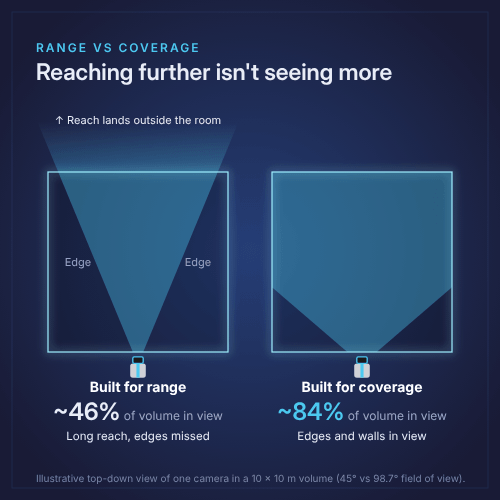
The overlap is what coverage really means: how many cameras can see each point in the volume. Field of view is a big part of it, but so is where cameras are mounted and whether they have the resolution to see a marker clearly from there. Think of a flashlight. Step back and it lights more of the room, but each marker takes up fewer pixels.
Our industry has a habit of comparing cameras by range: how far away a marker can be seen. Range looks good on a spec sheet. Unfortunately, it tells you very little about coverage. A camera can reach a long way and still give you unusable data near the edges of its own field of view. In a volume up to 10 by 10 meters, distance is rarely what fails you. The edges are.
Another choice is what happens to the data after the sensor captures it. Some systems keep the full grayscale image of each marker and do the heavy processing on the PC. Others reduce it to a point at the camera and discard the rest. The difference matters most when markers overlap, which happens frequently in motion capture. I’ll go deeper into that one in a follow-up post.
The point is that spec sheets for most mid-range 4MP cameras look like a tie. Same sensor, same square aspect ratio, same frame rate. The differences that decide what your edges look like live in the choices behind these numbers.
How we design for maximum coverage at Vicon
At Vicon, we treat the edges as part of the brief for every optical camera we make. Edge-of-volume capture shouldn’t mean edge-of-confidence results. A camera’s reach is only useful if it turns into coverage you can trust across the whole space, so teams can use the WHOLE space without worrying about weak spots near the walls.
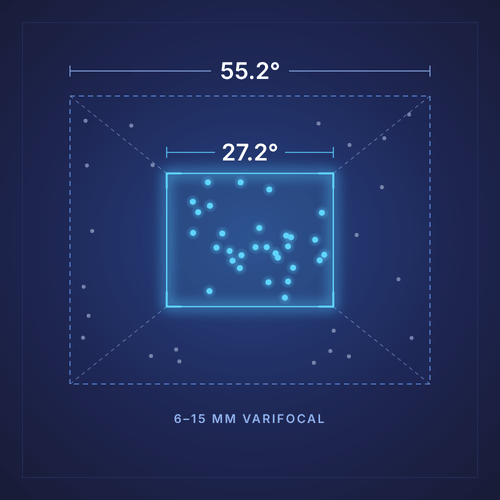
Two choices carry that through our camera range. The first is the field of view itself. The wider each camera sees, the more of the volume sits in view of several cameras at once. That overlap is what keeps a marker tracked when one camera loses it. The second is our lens. All our optical cameras are varifocal (except one, to be precise). So instead of being locked into one fixed field of view, each camera can be set to fit the space it’s in: a long walkway, a tall stage, a room with an awkward corner.
What teams get from that is fewer weak spots and fewer surprises during setup. The data from the edges can be trusted as much as the data from the center.
How Vero 4.2 extends coverage to the edges
We took that approach into the mid-range 4MP class, with wall-to-wall data consistency as the starting brief.
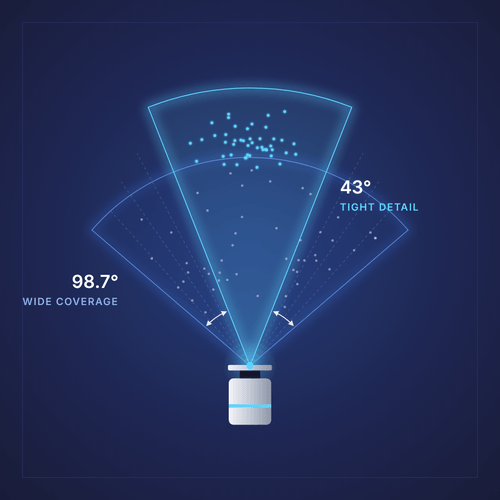
Vero 4.2 is the first mid-range 4MP mocap camera to pair trusted Vicon accuracy with unmatched coverage. At its widest it sees 98.7°by 98.7°, on a 1:1 square sensor, so the coverage extends as far up as it does across. In practice, that means more cameras can see the edges and corners of the room and the top of the volume at the same time. Compared with Vero 2.2, each camera covers about 30% more volume and sees about 80% more vertically. The subject’s feet stay tracked at the end of the walkway. A performer’s raised arm stays in view near the wall. A drone keeps its markers as it climbs and turns.
The strobe follows the same logic. It’s designed to light the full field of view evenly rather than to win on maximum distance, because in this size volume, even light at the edges does more for your data than extra reach.
Like our other varifocal cameras, it narrows to 43° when a project needs tighter detail, without a lens swap. What’s new is how much room you get at the wide end.
Rethinking the edges: What to ask when you compare cameras
Edges have been treated as a fact of capture: something to plan around, clean up, or cover with more cameras. We don’t think they have to be. When teams compare cameras, the question we’d encourage is not how far it can see, but how well every part of the space is covered.
FAQ's
Why does motion capture data drop out at the edges of the capture volume?
Near the walls, fewer cameras overlap, so when one camera loses sight of a marker there are fewer others to fall back on. Cameras with a narrower field of view make this worse, because less of each camera’s view reaches the edges and the top of the volume.
What determines camera coverage in a motion capture volume?
Coverage is how many cameras can see each point in the volume. It depends on each camera’s horizontal and vertical field of view, where the cameras are mounted and how far they sit from the capture area, and whether they have enough resolution to see your markers from there. Mounting cameras further back covers more space, but each marker takes up fewer pixels.
Is camera range the best way to compare mocap cameras?
In most capture spaces, coverage will matter more than range. Range tells you how far away a marker can be seen. Coverage tells you how many cameras see each part of the space well, including the edges, the corners and the top of the volume, which is where data is most often lost. The more cameras that see a marker, the fewer the gaps and the better the quality of your data is.
Do I need a 4MP motion capture camera?
It depends on what it is you’re trying to achieve, what your marker size is, how far your cameras sit from the action, and how many cameras you plan to use. Higher resolution helps most with small or tightly packed markers and large rooms, and it can mean fewer cameras for the same coverage.
How does Vero 4.2 compare with Vero 2.2 and will it work with my existing system?
Each Vero 4.2 camera covers about 30% more volume than a Vero 2.2, with about 80% more vertical field of view and higher res. So it can see the floor and the top of the volume near the walls at the same time. It keeps the same compact Vero form factor and drops into existing Vicon cabling, switches and software, so you can add it to a current system without changing the rest of the setup.
What is the Vero 4.2 field of view?
Vero 4.2 has a varifocal lens that covers 98.7° x 98.7° at its widest and 43° x 43° at its tightest. It uses a 4.2MP (2048 x 2048) square sensor and captures at 180 fps at full resolution.